
AI EXPENSES ANALYSER · FOR AUTOCOUNT
Zero manual key-in. Receipts straight into AutoCount.
- 🖼️Image
- 📁Whole folder
POSTED
Sound familiar?
Hours of key-in
Costly typos
Scattered PDFs
GL guesswork
Receipt in. Entry out.
1
Folder of billsPDF · Image
2
AI OCR reads every fieldBill No ·
Date · Total
3
AutoCount entriesCashbook · D/O ·
Sales
See It In Action
Demo video coming soon
Four screens. All your documents.
01
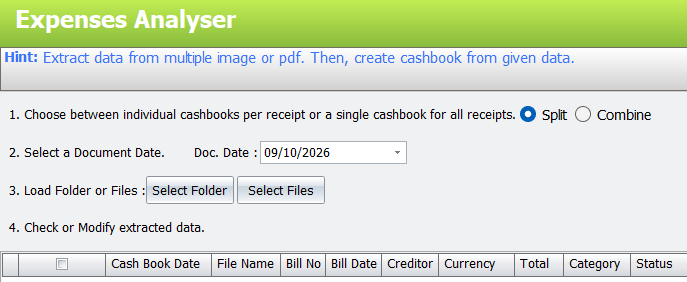
Drop in a folder. Get cashbooks.
SplitCombineSelect FolderSelect Files
02
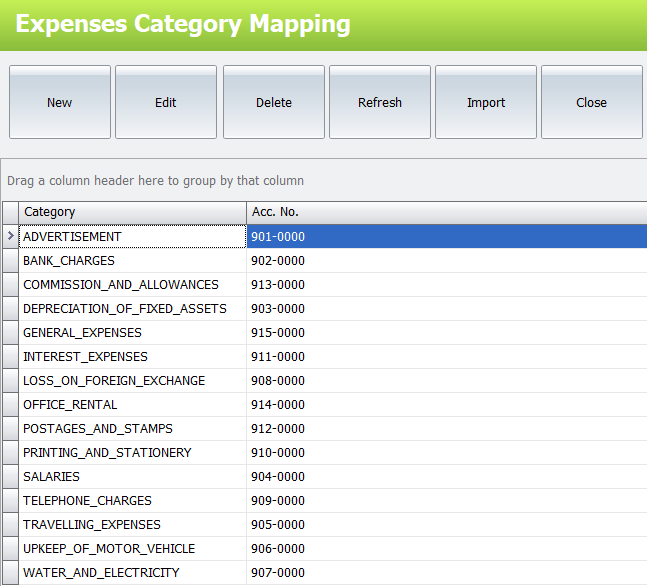
Every category finds its GL account
NewEditDeleteRefreshImport
03
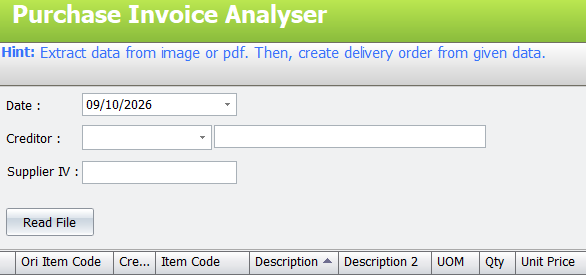
Supplier invoices into delivery orders
Read FileItem CodeUOMQtyUnit
Price
04
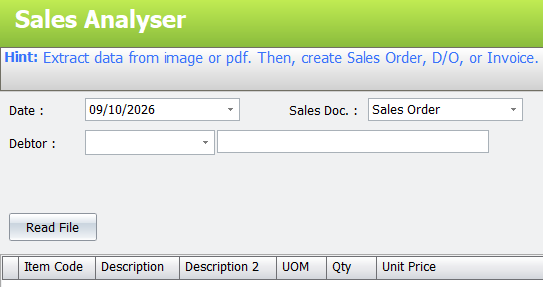
Customer documents into sales entries
Sales OrderD/OInvoice
Which document goes where
🧾Receipts & bills
Expenses Analyser
Cash Book
📦Supplier invoices
Purchase Invoice Analyser
Delivery Order
🛒Customer documents
Sales Analyser
S/O · D/O · Invoice